
Snow Team
HERE’S THE LATEST
Mother’s Day Gift Guide – 2018

Mother’s Day is May 13th! Let’s make sure mom feels pampered and loved this year. Your readers will find a great selection of Mother’s Day gift items at our merchants.
Check out the selection we have chosen below. These are just a few of the items we found to make moms happy.

Introducing: Luscious Cosmetics : ILoveLuscious.com
 |
Celebrate your Beauty with Luscious Cosmetics!
Snow Consulting is happy to be managing Luscious Cosmetics – an independent line of Glamourous and Affordable beauty products ranging from the make-up essentials everyone needs, the tools of the trade, to specific beauty solutions.
As one of the fastest growing beauty brands in the world, Luscious Cosmetics is proud to bring their fans (and soon to be fans!) a line of products that are exciting, cruelty free, Vegan and Vegetarian friendly – and so innovative that they have caught the attention of makeup artists, beauty addicts and celebrities alike.

“At Luscious Cosmetics, we take the business of beauty very seriously. The company was founded with the purpose of creating high quality cosmetics with an affordable price tag, but without ever compromising on ingredients or ethics.”
Luscious Cosmetics believes there are no rules and no limits to create your own signature look to express yourself!
Join this ShareASale Affiliate program today – and find out just how far you can go with Luscious Cosmetics.
Johnny Shades
Snow Consulting is so excited to welcome Johnny Shades to the Snow Fashion line-up!
Behind every successful online retailer is a common factor…. Passion! And Johnny Shades has a true passion for their incredibly unique product line – they are all about the Rock ‘N Roll experience, a luxurious lifestyle brand of Sunglasses, that is affordable for anyone.

The talented team at Johnnyshades.com have spent more than a decade creating a line of luxury Sunglasses of the highest quality, yet surprisingly affordable. They have worked hard visiting MANY industry trade shows to build connections with smaller boutique manufacturers. We are sure you will agree they are unlike anything else on the market today!
While their largest customer base is within the American market – JohnnyShades.com ships WORLDWIDE! Not only are they proud to offer their amazing affordable pricing to customers around the world, but with the huge bonus of FREE SHIPPING! Hundreds of thousands of Johnny Shades have been shipped to happy customers ALL around the world!
JohnnyShades is being Co-managed by Lessie Purpera and Teena Duliba. We would love to hear from you – feel free to email us anytime! You can join this ShareAsale program HERE.
Introducing Source 4 Ink
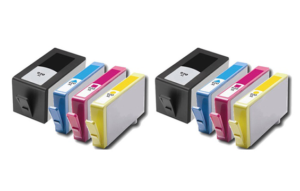
Source4Ink is your source for high quality ink cartridges at deep discount prices!
 We are pleased to announce the launch of the Source4Ink Affiliate Program in ShareASale. Randy Norton is managing the program and you will find all the details and join link here.
Source4Ink specializes in buying top quality printing cartridges directly from the manufacturer at deep discount prices. They can deliver ink to your site visitors for a great price and you earn 15% commission! There are coupons available in the ShareASale deals database, too.
- 15% Commission on all products!
- 90 Day Tracking Cookie
- Open PPC Policy
Introducing iDecoz: Decorate Your Life!
We’re excited about sharing this new affiliate program with you. iDecoz.com offers a selection of functional fashion for your technology and trendy accessories for your lifestyle!

These fun accessories are a perfect fit for gift guides. They make great stocking stuffers and gift exchange choices. All the program details are here.
The iDecoz affiliate program is new at ShareASale. Ginette is launching the program; reach out if you have questions. Join immediately by clicking this link.
2017 Holiday Gift Guide

2017 Holiday Gift Guide
Each Holiday Season I look forward to flipping through that years’ Wish Book. Everything had a special sparkle to it between those paper-thin pages packed with toys, treasures, and treats! And with that same childlike anticipation, we are happy to bring you the Snow Consulting Holiday Gift Guide!
The kids on your list will love the latest Character Costumes from Find Costume. While Lightake has ALL the latest trendy gadgets! If you have a budding musician on your list – Loog is a great place to get them started on their stardom.
For the BIG kids, watch his eyes light up with something from Car and Truck Remotes. Maybe its that special piece of hardware from Cobra Electronics. Escort offers industry leading radar detectors and car accessories he will love. For the professional on your list – Discount Watch Store and Ties.com will have him looking his best.
The ladies are not to be left out with all that sparkles from Soufeel and Frost NYC. Find those special items she will wear with joy from K-DEER, FewModa, ROMWE, SheIn, and Whurk Boutique. And no lady would object to something from The Perfume Spot!
We have all the bases covered for the Sports Lovers too, at Do It Tennis, Fairway Golf, Hickies, Hockey World, and Hyperwear.
Everyone has those hard to buy for on their list. You are sure to find exciting gift ideas at Future Memories, Glasses Shop, and the Wine of the Month Club. No matter what their interests, you are sure to find something for everyone….and don’t forget to make your own Wish List!
Gifts for Her
Gifts for Him
Gifts for Kids
Lifestyle Gifts
Join The Loog Guitars Affiliate Program
Fun and Easy Way to Learn Guitar! Ages 3+
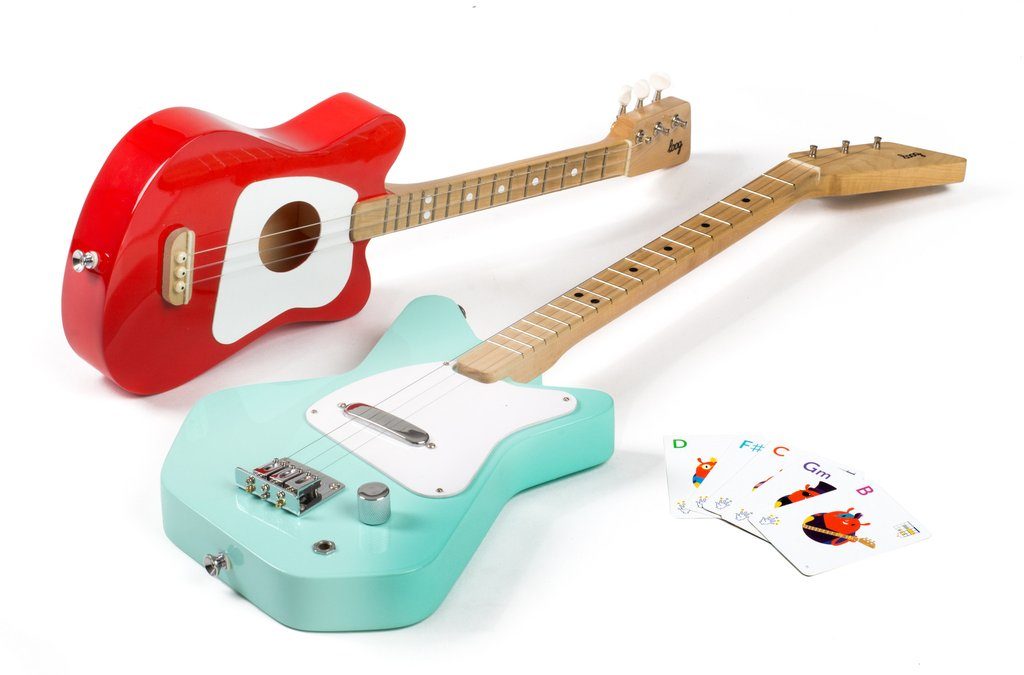
LoogGuitars.com. A Loog is a a line of small, 3-string guitars designed to make it fun and easy for anyone to play music. They come with an app that gets kids playing songs on day one.
Exciting new affiliate program – Fun and easy way to learn guitar! You can join at ShareASale. Randy Norton is managing the program. Program details are here.
Learn on a Loog. Play any guitar. Loog Guitars use the first three strings of a guitar: same strings, same tuning. This is why finger placement and everything you learn on a Loog can be applied on a 6-string guitar too. And with the included flashcards and app, you’ll be playing songs on day one.
The Loog app The free Loog app has everything you need to play songs: video lessons, chord diagrams, a tuner and even a monkey drummer to help you stay on the beat. It also includes a digital songbook so you can learn guitar by playing real songs by The Beatles, The Rolling Stones, Taylor Swift, Bruno Mars and more.
Downloading Datafeeds – SAS
Learning to use datafeeds will improve your niche sites, give you access to more product information and generally help boost your web business. Increased traffic and more sales happen when you keep content unique and fresh, so don’t plan to just plug and play – learn to pick and choose what products and what information will match up with your topics. It works!
There’s more to handling datafeeds than just finding and downloading them:
- Find available feeds, sort categories and download what you need. Then manipulate the information inside.
- Loading those products to the server for your site or creating a post with the images and links.
- Pulling the information into a post template so displaying the feed is “automated”.
- Updating feeds when information changes
What is a datafeed exactly?
The easiest way for me to visualize a datafeed is to see it as a spreadsheet. Even though it is usually presented as a CSV file, that just means commas or tabs are separating the data you would normally see in a spreadsheet cell. You can upload a CSV file into a spreadsheet and, conversely, you can save a spreadsheet as a CSV file.
A datafeed is an inventory sheet of the merchant’s products. Each row (think spreadsheet) represents one product. If the product comes in different sizes, different colors, different anything – each choice will have its own row.
The cells going across the row are for the various bits of information you need to display that product on your site: Name, Landing Page, Large Image, Thumbnail Image, category, Retail Price, Sale Price, etc. There are many ways a network can choose to accept datafeeds; each network usually sets up the template criteria so they are uniformly structured.
How do I get a datafeed from ShareASale?
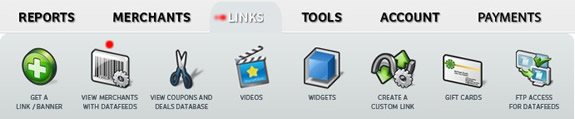
I marked the Links tab and the Datafeed choice with red dots in the image above. You find these tabs in your ShareASale dashboard as an affiliate. You can also find the same Datafeed choice under the Merchants tab, labeled: Find merchants with Datafeeds.
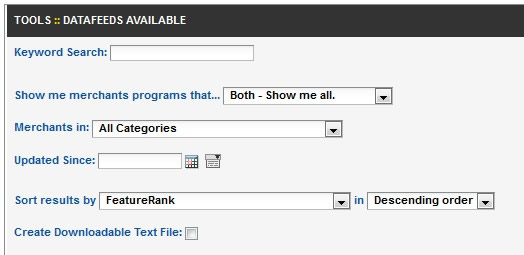
Make selections to suit your site and see what datafeeds are available
Make some selections to narrow the results:
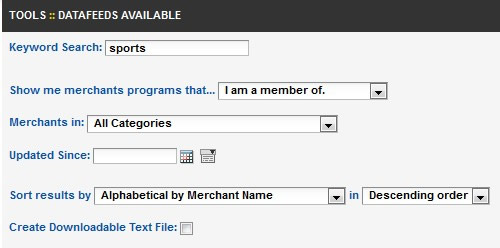
And then choose a merchant with the number and type of products you’re looking for:
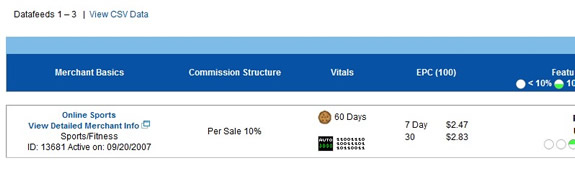
Now let’s take a look at that information graph – Using a different merchant for the following details – don’t get confused, I just wanted to show you more than one!
Full bar gives you lots of info, but it’s too small to really see, so I’ll break it up into 3 pieces for an up-close look right below this image:

Let’s take the first part – from the far left. We see the merchant name, a link to the profile page and some basic details in case you’re deciding whether or not to join:
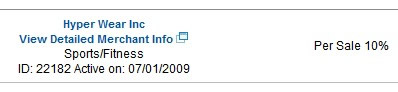
The second part, moving from the left to the center, gives us more program details (CPC, cookie duration and AutoDeposit) and some important information about the feed. The green circles tell you how many of the SAS datafeed enhancement features this merchant uses. You can also see how many products are in the feed and when it was last updated.

This last piece – the far right of the graphic – is what you’re looking for so you can download or find a specific product. I duplicated the green circles and the number of products so you could find your place, and then on the far right you see 3 choices: Download as a csv (comma separated values) file, or Search Products, and Apply for FTP access, which is a box you check if you want to transfer the file via FTP now or in the future:
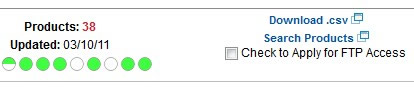
Let’s look at Download as csv first. Very straighforward. Click that option and you’ll get this instruction:

The image above tells you that: 1) Once you save this file and open it, you will have to replace USERID with your own affiliate number. Just in case you don’t know your affiliate number, it’s right there (I’ve hidden mine under the gray bar). 2) When your computer asks open or save?, choose Save. Then you can open it with the program of your choice. I use a spreadsheet to open, but remember it’s a csv file, so you have to look for it with *all files instead of just xls or xlsx files. 3) One last thing. When you’re opening the file, your computer will ask you about the format of the data. Data is separated by TABS and not by commas, as you would expect in a csv file. Good to know when you see the options!
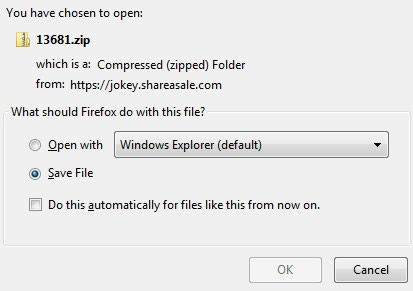
Choose Save and rename the file something you’ll remember when you look for it.
Before we stop and let you rearrange your spreadsheet data to suit your site, I want to show you another way to use the datafeed. This way is great for beginners and small sites where 1 or 2 products in a category is plenty. These instructions also show you what it looks like when you get to the datafeed info via the Links tab.

The image above is from the LINKS tab for the merchant OnlineSports. You can see banner choices, text links, coupon deals and datafeed all in one place for the same merchant. In this example, OnlineSports’ datafeed has 102,000+ products. I think we’re going to have to do some search narrowing:

If you look near the Search box, you’ll also see an opportunity to download csv file. This is a great feature for narrowing your results until you get exactly what you want and THEN downloading the file!
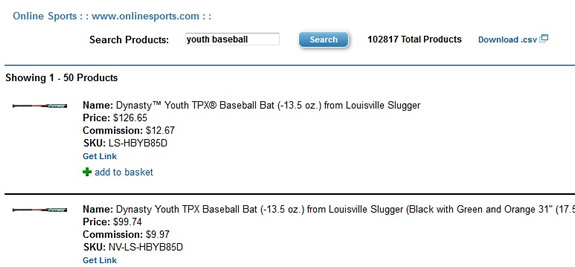
We searched for baseball and got way too many, so we narrowed it to youth baseball and as you can see, there are now 50 products showing up that pulled from the entire OnlineSports datafeed. For each product, you see an image and an opportunity to get the individual link if you want, or add it to your “basket”, which is a feature SAS uses to make gathering things easier for affiliates.
If you’re only going to incorporate a few products, the “get link” feature is what you want. When you click it, you’re going to see the various ways the link can be written for you. Text only, large image, thumbnail image, with and without price, merchant name, etc. I hope you can see now that you don’t have to be a technical wizard to find the right products to feature on your site. Learn a few more tricks with datafeeds and you’ll be able to manipulate whole categories of inventory for your niche.
ShareSubscribe
Deep Linking with CJ Affiliate Links
Deep linking to a specific product page increases conversions and produces bigger sales! Commission Junction CJ Affiliate now has a bookmarklet you can add to your toolbar and make direct, deep links as you browse your merchant’s site. Not all merchants have implemented the system yet, so keep these direct link instructions marked, too! At the time of this edit, CJ was also adding a widget you can use in the interface to build pages of products that you mix and match to go with your content.
Get your CJ bookmarklet by clicking here.
Here’s how you create a deep link at CJ Affiliate
The merchant has to have at least one text link enabled for direct linking. We give you the exact link number in the Merchant Information Center under deep linking. Here’s how you tell if you have the right link:
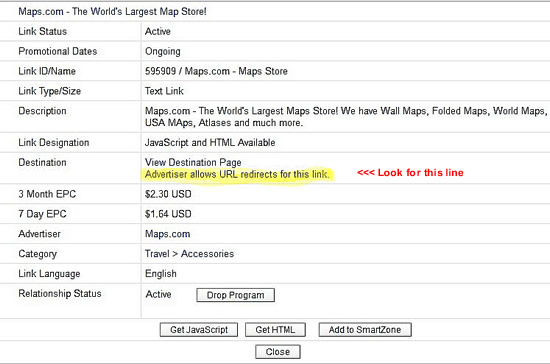
Look at the highlighted line above. If it says Advertiser allows URL redirects for this link – it’s enabled!
Select Get HTML code. In the next screen, you’ll see where to put the URL for the new destination landing page.
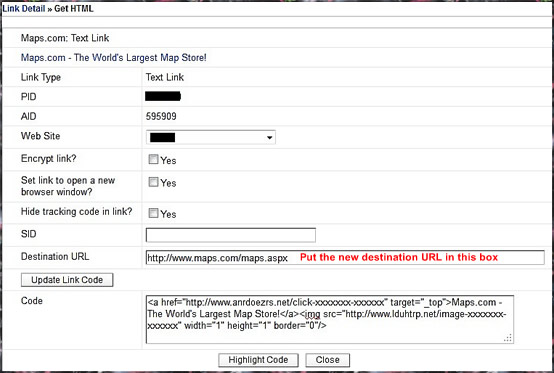
That’s it! Everything else about getting a link is the same as usual. If there is no destination URL box for the link, then the link has NOT been enabled for deep linking.